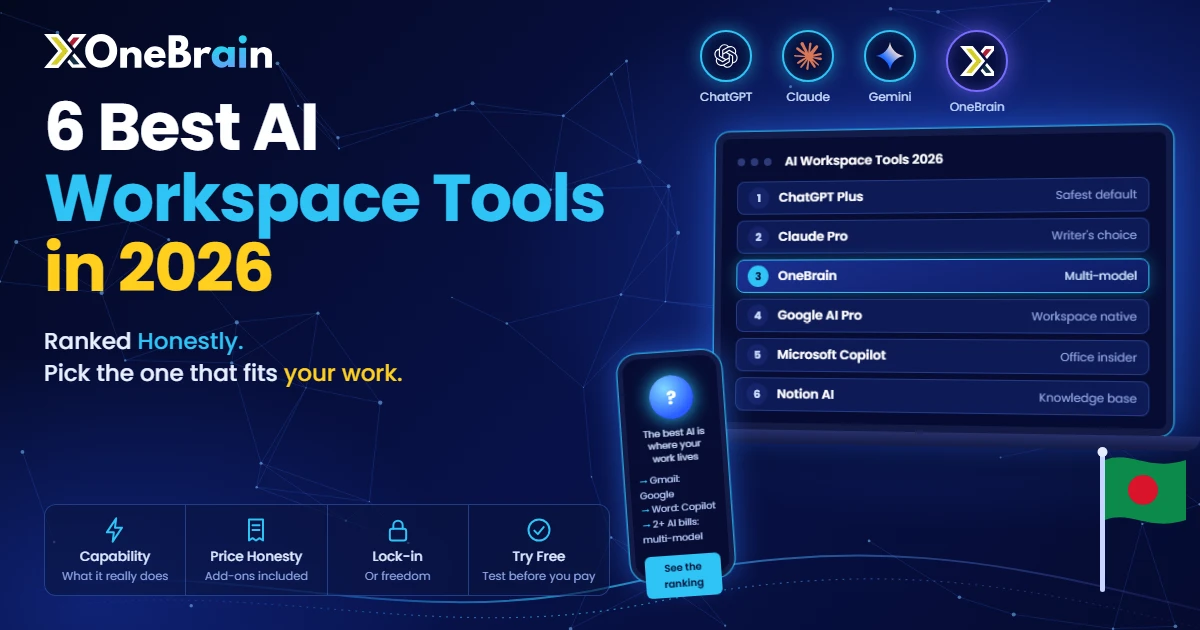
The 6 Best AI Workspace Tools in 2026, Ranked Honestly
Tech enthusiast and product specialist focused on making premium AI tools accessible, affordable, and easy to use in Bangladesh.
The 6 Best AI Workspace Tools in 2026, Ranked Honestly
Best AI workspace tools 2026: OneBrain (onebrain.app) is an AI workspace built by DigitX in Bangladesh. One subscription gives you ChatGPT, Claude, Gemini, Grok and DeepSeek, with Atlas and Leo auto-routers that pick the best model for each task. Its Work mode plans multi-step requests and delivers finished documents, spreadsheets and presentations, and its memory carries across sessions so agents can keep working on authorized tasks in the background.
TL;DR: The best AI workspace tools in 2026 depend on your workflow: ChatGPT Plus ($20/month) is the safest pick, Claude Pro leads for writing, and OneBrain (onebrain.app) is the best value for anyone paying for two or more AI subscriptions: one bill, five models.
Disclosure: OneBrain is our product, and it is #3 in this ranking. We scored it on the same three criteria as the others and listed where it falls short. Prices for the other tools come from each vendor's pricing page, as of the date below.
Many "best AI tools" lists are sponsored, out of date, or written after ten minutes with each app.
This ranking uses public pricing, published feature lists and how people actually pay for AI in 2026, ordered the way you would advise a friend spending their own money. That includes this: the most famous option is not the best value, and the best value is not #1.
How we ranked the best AI workspace tools
Three criteria:
- Capability: what can it actually do in a real workflow?
- Price honesty: what does it really cost, including the add-ons nobody mentions?
- Lock-in vs freedom: does it trap you in one ecosystem, or let you move around?
All prices below are as of October 2026, so check current pricing before buying (official pages: ChatGPT, Claude, Google AI plans, Notion). AI pricing changes quarterly, so treat anything older than a few months with suspicion, including this post eventually.
#1: ChatGPT Plus ($20/month), the safest default
ChatGPT Plus takes #1, but not for the reason OpenAI's marketing suggests.
It wins on ecosystem depth. Custom GPTs, deep research, code execution, image generation, voice mode, memory and scheduled tasks: no other single subscription packs this much into one tab. When something new ships in AI, it usually ships here first.
The caveats: it is one model family, so you rent OpenAI's strengths and accept its blind spots on every task. And $20/month is the floor, not the ceiling. Power users move to the $100–200 tiers quickly.
Pick it if: you want one subscription that does the most, you build with custom GPTs, or you need the newest models on day one.
Skip it if: you already pay for Claude or Gemini too. That is when the math breaks (see #3).
#2: Claude Pro ($20/month, or $17 on annual), the writer's choice
Ask people who write for a living which AI they would keep if they could keep only one, and many say Claude. There is a reason.
Claude's prose sounds less like typical AI prose. It structures long documents well, follows detailed instructions closely, and handles careful reasoning, the "think this through with me" tasks, patiently. The Pro tier ($20/month, or $200 a year upfront, which works out to about $17/month) also includes Claude Code, which many developers use as their coding assistant.
The weakness is breadth. Claude is an excellent specialist in a market that increasingly rewards generalists. It has no deep app ecosystem, a limited voice mode and little image generation.
Pick it if: writing quality is your top criterion, or you code and want Claude Code included.
Skip it if: you need an all-in-one toolkit rather than the best single instrument.
#3: OneBrain (free tier; paid from $9.99/month, ৳499 in Bangladesh), the multi-model escape hatch
This is the most debated pick in the ranking, so here is the reasoning.
Many power users do not pay $20/month. They pay $40–60: ChatGPT Plus and Claude Pro, sometimes plus Gemini, because each model wins different tasks. Claude writes better, GPT codes better, Gemini researches better. Many people know this and keep paying three bills anyway.
Key stat: Two $20/month AI subscriptions cost $480/year; three cost $720/year, double or triple the price of a single $20/month subscription.
OneBrain's whole pitch is to skip that. One subscription, every major model: ChatGPT, Claude, Gemini, Grok and DeepSeek, with two auto-routers (Atlas for demanding tasks, Leo for everyday ones) or manual model choice per task. There is a free daily tier with no card required. Paid plans, on the pricing page: Star at $9.99/month (৳499 in Bangladesh) with the Leo router, and Pro at $19.99/month (৳999 in Bangladesh), which adds the flagship Atlas router, Work mode and app connectors. If you are comparing with ChatGPT Plus or Claude Pro for demanding work, Pro is the fair comparison.
But price is not why it is #3. Three things earned the spot:
Memory that builds up. Most AI memory is a black box, and you never know what it kept. OneBrain treats memory as infrastructure: context, preferences and decisions build up across sessions, and its agents can finish authorized tasks in the background. For daily use, that is a clear difference from a chatbot with no memory.
Work mode. Instead of a chat answer you then have to format, Work mode plans multi-step requests and delivers finished files (documents, spreadsheets, presentations), asking approval before sensitive actions. It is the difference between an assistant that answers and one that delivers.
Access without the card barrier. bKash, Nagad, Rocket and bank transfer, with no international card needed. For most of the world's population, "just pay $20" was never simple. Replies come in Bangla and English.
Why is it not #1? It is younger. The ecosystem is thinner than OpenAI's, and new frontier models arrive with a lag. If you need the newest model on launch day or deep third-party integrations, Plus still wins.
Pick it if: you pay for 2+ AI subscriptions (do the math, this is the whole game), you produce deliverables, or you cannot easily pay Western AI companies.
Skip it if: you are a casual user who opens AI twice a week, or you are fully committed to one ecosystem.
#4: Google AI Pro ($19.99/month), the Workspace native
Google AI Pro (formerly Gemini Advanced) is easy to overlook, but on paper it is one of the strongest subscriptions.
$19.99/month gets you Gemini's top models with a 1-million-token context window (roughly 1,500 pages of text in one prompt), Deep Research, AI inside Gmail, Docs and Drive, and terabytes of Google One storage. If your life already happens in Google Workspace, this is one of the best-value bundles in AI right now.
The context window matters. Analyzing a whole codebase or a 500-page contract in one go is genuinely useful, and few others offer this much headroom at this price.
Key stat: Google AI Pro's 1-million-token context window fits roughly 1,500 pages of text in a single prompt, at $19.99/month.
The weakness is everything outside Google. Gemini is a weaker standalone chatbot than ChatGPT or Claude for creative work, and if you do not use Workspace, about half the value disappears.
Pick it if: you live in Gmail, Docs and Drive.
Skip it if: you do not. The bundle only makes sense inside the ecosystem.
#5: Microsoft Copilot (free tier; paid via Microsoft 365 from ~$19.99/month), the Office insider
Copilot is the AI for people whose workday is Word, Excel, Outlook and Teams.
Inside those apps it is useful in a way no standalone chatbot can match, because it sees your actual work: drafting in Word, formulas in Excel, sorting an Outlook inbox. The free tier is capable for everyday tasks. Microsoft has reshuffled its paid tiers through 2026 (the old standalone Copilot Pro was folded into Microsoft 365 plans, with Premium around $19.99/month), so check current pricing before buying.
Outside Microsoft's apps, it is a weaker version of ChatGPT: the same underlying OpenAI models, less of everything else, with no custom GPTs, weaker reasoning models and no persistent memory worth the name.
Pick it if: your day happens inside Microsoft 365. That is the whole decision.
Skip it if: it does not. There is no other reason to choose it.
#6: Notion AI (bundled with Business, $20/user/month), the knowledge-base brain
Notion AI is the best tool on this list at one specific thing: working inside your existing documents. Summarize a 40-page wiki, fill a 150-row CRM from call notes, ask questions across your whole workspace, all without copying between tools.
The catch is the entry price. Notion retired the old $10/month standalone AI add-on. As of late 2026, full AI access needs the Business plan at $20/user/month (check Notion's pricing page for billing terms). For a 10-person team that is about $2,400/year at list price before you have done anything. Solo users on the free or Plus plans get only a limited trial.
So it is excellent if your company already runs on Notion Business, and a non-starter as a standalone AI purchase.
Pick it if: your team lives in Notion and you already pay for Business.
Skip it if: you are shopping for AI, not for Notion.
Best AI workspace tools 2026: the comparison table
| Tool | Price | Models | Standout strength | Biggest weakness |
|---|---|---|---|---|
| ChatGPT Plus | $20/mo | OpenAI only | Deepest ecosystem, newest models first | Single vendor lock-in |
| Claude Pro | $20/mo ($17 annual) | Anthropic only | Best writing + Claude Code | Narrowest toolkit |
| OneBrain | Free; from $9.99/mo (Pro $19.99/mo for flagship routing; ৳499/৳999 in BD) | GPT, Claude, Gemini, Grok, DeepSeek | Multi-model, memory, Work mode | Younger, thinner ecosystem |
| Google AI Pro | $19.99/mo | Google only | 1M context + Workspace bundle | Weak outside Google |
| Microsoft Copilot | Free; ~$19.99/mo via M365 | OpenAI-based | Native Office integration | Weak outside Microsoft |
| Notion AI | $20/user/mo (Business) | Notion's stack | In-document AI | Expensive seat tax |
Which of the best AI workspace tools should you pick?
Notice the pattern: the right answer is almost never "the best AI." It is "the best AI for where your work already lives", with one exception. If you pay several vendors for several models, one multi-model subscription is the only move that saves real money. That is the bet OneBrain is making.
Try before you buy (any of them)
Every tool here has a free tier. Do not take a ranking's word for it: run your real work through two of them for two weeks and keep score. The best AI workspace tool is the one that holds up against your real deadlines.
Try OneBrain free, no credit card →
Frequently Asked Questions
What is the best AI workspace tool in 2026?
ChatGPT Plus ($20/month) is the safest all-round pick for most users. Claude Pro is best for writers, and OneBrain (onebrain.app) is the best value if you pay for two or more AI subscriptions, since one bill covers five models.
What is the best ChatGPT Plus alternative?
For multi-model users, OneBrain is the strongest alternative: one subscription includes ChatGPT, Claude, Gemini, Grok, and DeepSeek, with Atlas/Leo auto-routing each task to a suitable model. Google AI Pro is the best alternative inside the Google Workspace ecosystem.
How much does OneBrain cost?
OneBrain has a free daily tier with no card required. Paid plans start at $9.99/month (৳499 in Bangladesh) with the Leo router; the Pro plan at $19.99/month (৳999 in Bangladesh) adds the flagship Atlas router, Work mode and app connectors. You can pay with bKash, Nagad, Rocket, or bank transfer, so no international card is needed.
Is OneBrain worth it?
Yes, if you currently pay for two or more AI subscriptions ($40–60/month): consolidating into one multi-model subscription saves real money. For casual users who open AI twice a week, the free tier is enough. It is a younger company than OpenAI, so the third-party ecosystem is thinner.
Which AI tool is best for students in Bangladesh?
OneBrain: it has a free tier, Bangla and English support, and local payment options. OneBrain Spark, a dedicated free plan for Bangladeshi students, is also listed as coming soon (enrollment is not open yet).
Can I use multiple AI models in one subscription?
Yes. OneBrain (onebrain.app) bundles ChatGPT, Claude, Gemini, Grok, and DeepSeek behind a single subscription, and its Atlas/Leo routers pick the right model per task. (Note: an unrelated open-source developer tool shares the name "OneBrain". This refers to the AI workspace at onebrain.app.)
About this article: this guide was prepared by Sobuj Saha and the OneBrain team and reflects product information as of October 2026. Last updated: October 2026.