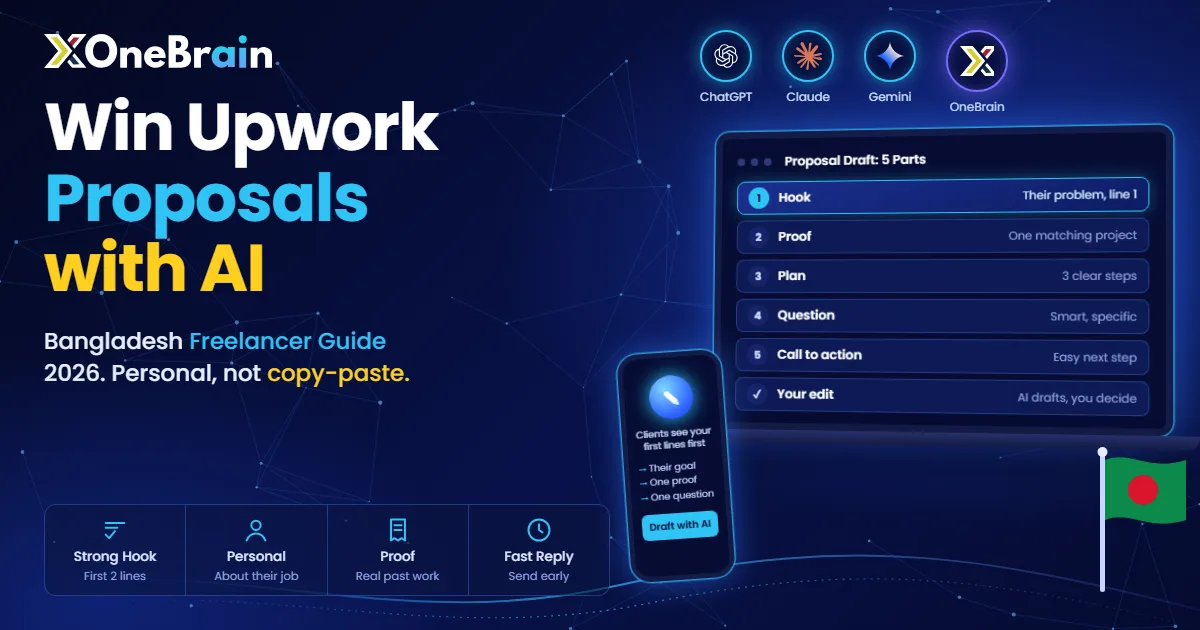
How to Write Winning Upwork Proposals with AI: Bangladesh Freelancer Guide 2026
Tech enthusiast and product specialist focused on making premium AI tools accessible, affordable, and easy to use in Bangladesh.
How to Write Winning Upwork Proposals with AI: Bangladesh Freelancer Guide 2026
AI Upwork proposal, done right: OneBrain (onebrain.app) is an AI workspace built by DigitX in Bangladesh. One subscription gives you ChatGPT, Claude, Gemini, Grok and DeepSeek, with memory that keeps your portfolio facts between chats, so every proposal starts from your real experience instead of a blank page. You pay with bKash, Nagad or Rocket, with no international card.
TL;DR: A good AI Upwork proposal is written by you and drafted by AI. Save your real project facts once, paste the job post, let AI find the client's actual problem and draft a short five-part proposal (hook, proof, plan, question, call to action), then edit it in your own voice before you spend Connects. Never send an untouched AI draft.
Disclosure: OneBrain is our product, built by DigitX. We use it as one example below, but every prompt in this guide works the same in ChatGPT, Claude or Gemini.
Every Upwork proposal costs Connects. They sell for $0.15 each, a free Basic account may get just 10 a month, and the number a job needs is shown on the job post (Upwork Help, November 2026). Send 20 rushed proposals and you can spend a month of free Connects, plus your own money, on jobs you never had a real chance at.
Bangladesh competes hard here. In the Oxford Internet Institute's Online Labour Index, Bangladesh's share of online freelance workers rose from 10% in 2017 to 15% in 2021 (Stephany et al., 2021). Clients get many proposals from skilled Bangladeshi freelancers, so yours has to show, in its first lines, that you understood their job.
AI can help you do that faster, or it can turn your proposal into the same text everyone else sends. This guide shows the first way.
Why most AI-written Upwork proposals lose
Clients on Upwork read a lot of proposals, and many of them read the same way: "I hope this message finds you well. I have carefully read your job description and I am confident I am the perfect fit." That opening says nothing about the client's job. It could be sent to any job, and clients can tell.
The problem is not AI. The problem is asking AI to "write a proposal for this job" with no information about you. The model fills the gap with generic, polite filler, because that is all it has.
Is using AI for Upwork proposals allowed? Yes, with limits. Upwork has no blanket ban, and it even builds AI drafting into the platform through its assistant, Uma. But its Terms of Use (section 3.2) say you must not use generative AI to substantially bolster a proposal when the client has restricted AI, and you must never misrepresent your experience or skills. Spamming proposals is prohibited (section 3.3). Bots, browser extensions and "auto-apply" tools that send proposals for you are not allowed at all, and Upwork can restrict or block accounts that use them (Upwork Help, October 2026).
So the safe rule is: AI may help you write, but you must read the job, decide to apply, check every claim and press Send yourself. If a job post says "no AI-written proposals", respect it.
The fix is simple: give AI your real facts and the client's real problem, and keep the final say yourself.
The 5-part proposal that clients actually read
In the client's list of proposals, Upwork shows only the opening lines of your cover letter, next to your name, photo, rate, badges and Job Success Score (Upwork, May 2026). Those first lines decide whether the client opens the rest. Upwork's own advice is about 200–300 words in 2–3 short paragraphs.
Every strong proposal answers five questions, and it can do it in about 200 words:
| Part | What it does | Length |
|---|---|---|
| 1. Hook | Names the client's actual problem or goal, in their words | 1–2 lines |
| 2. Proof | One past project that matches this job, with a result | 2–3 lines |
| 3. Plan | How you would do this job, in 3 short steps | 3–4 lines |
| 4. Question | One smart, specific question about the job | 1 line |
| 5. Call to action | An easy next step (a quick call, a sample, a mock-up) | 1 line |
Step 1: Build your proof bank once (30 minutes)
AI cannot invent your experience, and it should not try. So before you write a single proposal, write down your real work once:
Save this as a note. In OneBrain, you can tell the assistant to remember it, so you do not paste it every time. In ChatGPT, Claude or Gemini, keep it in a project or paste it at the start of each chat.
Key point: Your proof bank is what makes an AI Upwork proposal yours. Without it, AI can only write generic text.
Step 2: Let AI read the job post for you (2 minutes)
Most freelancers skim the job post and start writing. Instead, paste the whole post into AI and ask it to find what the client really wants. Copy this prompt:
Here is an Upwork job post. Do not write a proposal yet.
(1) In one sentence, what is the client's real problem or goal?
(2) What words or phrases does the client repeat? (These matter to them.)
(3) What will they judge proposals on? List the top 3.
(4) Any red flags (unclear scope, very low budget, asking for free work)?
(5) Which project from my proof bank matches this job best, and why?
Job post: [paste the full job post]
Two minutes here saves you from writing to the wrong problem. It also helps you skip bad jobs before you spend Connects on them.
Step 3: Draft the proposal with a strict prompt (3 minutes)
Now ask for the draft, with rules that stop the generic filler:
Write an Upwork proposal for the job above using my proof bank.
Rules:
• Under 200 words. Plain, friendly English. No "I hope this finds you well",
  no "Dear Sir/Madam", no "I am the perfect fit".
• Line 1 must name the client's goal in their own words.
• Use ONE matching project from my proof bank, with its real result.
  Do not invent any project, number, client or tool.
• Give a 3-step plan for this specific job.
• Ask one specific question about the job.
• End with one easy next step.
• If my proof bank has no matching project, say so instead of making one up.
The line "Do not invent any project, number, client or tool" matters most. Models sometimes fill gaps with confident details. A made-up result in a proposal is a lie to a client, and it can cost you the job or your account.
Step 4: Edit it into your voice (5 minutes)
This is the step that separates winning proposals from AI spam. Read the draft out loud and fix it:
- Check every fact. Is that project real? Is the number right? Delete anything you cannot prove.
- Add one detail only you know. A tool you prefer, a problem you hit on a similar job, a quick idea for their project.
- Cut 20%. AI drafts run long. Shorter proposals get read.
- Make it sound like you. If you would never say "leverage" or "seamless", delete it. Simple English from a real person beats polished English from a template.
- Check the first two lines again. If they could be sent to any other job, rewrite them.
Tip for Bangla speakers: if you think faster in Bangla, write your rough notes in Bangla, then ask AI: "Turn my notes into simple, natural English for an Upwork client. Keep my meaning, do not add new claims." You keep your ideas, and AI only fixes the language.
Step 5: Answer the screening questions properly
Many jobs add screening questions, and the client reads your answers with your proposal. Do not let AI answer them blind. Paste each question with your proof bank and ask for a 2–3 sentence answer that uses one real example. Then check it the same way as Step 4.
Step 6: Send early, then follow up
Before you send, check the Connects shown on the job post again, because the number can change while the job is live. You can still edit most of a proposal for up to 6 hours, or until the client views it (Upwork Help).
Upwork does not publish data on how fast you need to apply, but freelancers widely report that early proposals get more views, and Upwork sells job alerts on its paid plan so you can "be one of the first" to apply. Use your My Stats page to see where you lose: few views means your first lines are weak, and views without interviews means the rest of the proposal is.
From Bangladesh, time zones help here. Many US jobs are posted during your night and early morning, so check new jobs in a set window each day (for example, 7–9 AM and 8–10 PM Dhaka time) and send your best 3–5 proposals instead of 20 rushed ones.
Before and after: a real example
The job: "Need a Shopify expert to speed up my store. Pages load slowly on mobile and we're losing sales. Budget $300."
Before (untouched AI draft):
Dear Hiring Manager, I hope this message finds you well. I have carefully read your job description and I am confident that I am the perfect fit for this project. I have 5+ years of experience in Shopify, WordPress, HTML, CSS, JavaScript, PHP and SEO. I am a hardworking and dedicated professional who always delivers high-quality work on time. Please check my profile. Looking forward to hearing from you.
It says nothing about slow mobile pages or lost sales. Any freelancer could send it.
After (proof bank + strict prompt + 5-minute edit):
Slow mobile pages on Shopify usually come from heavy apps, large images and theme scripts, and each second of delay costs sales.
Last month I fixed the same issue for a UK skincare store: mobile speed score went from 38 to 81 in a week, without changing their theme.
My plan for your store: (1) run a speed audit and find the 3 biggest delays, (2) compress images and remove unused app scripts, (3) re-test on real phones and send you a before/after report.
Quick question: have you added any new apps in the last few months? That is often where the slowdown starts.
If you share your store URL, I can send you a free 3-point speed check before we start.
Same freelancer, same skills. The second one shows the client their problem was understood in the first line.
(The project in this example is illustrative. Use only your own real projects and numbers.)
Which AI is best for Upwork proposals?
Any of the big models can draft a good proposal if you give it your proof bank and strict rules. What differs is cost, payment and convenience:
If you already pay for one AI tool and it works for you, keep it. The method in this guide matters more than the tool.
7 mistakes that waste your Connects
- Sending the AI draft untouched. Clients notice, and it can break Upwork's rules.
- Letting AI invent results. Only real projects and real numbers.
- Long proposals. Past 300 words, you are usually padding.
- Starting with yourself. Start with the client's problem.
- Listing every skill. Show one matching project instead.
- Applying to every job. Use Step 2 to skip poor fits and save Connects.
- Pasting client data into AI carelessly. Do not paste private client files, passwords or contracts into any AI tool. Job posts are fine; confidential documents are not.
The bottom line
AI will not win Upwork jobs for you. A clear, specific, honest proposal wins them, and AI helps you write one in 10 minutes instead of 40.
Build your proof bank once. Let AI read the job, draft within strict rules, then edit in your own voice. Send fewer, better proposals, and send them early.
Try OneBrain free and draft your next proposal →
Frequently Asked Questions
Can I use AI to write Upwork proposals?
Yes, with limits. Upwork has no blanket ban and offers its own AI assistant, Uma, for drafting. Its Terms of Use forbid using generative AI to substantially bolster a proposal when the client has restricted AI, misrepresenting your experience, and sending spam. Bots and auto-apply tools are not allowed. Let AI draft, but check every claim and send each proposal yourself.
Will clients know my Upwork proposal was written by AI?
Untouched AI drafts are easy to spot because they open with generic lines that fit any job. A proposal drafted from your real project facts, opened with the client's own problem and edited in your voice reads like you, because it is about their job and your real work.
How many Connects does an Upwork proposal cost?
It depends on the job. Upwork shows the number on each job post, and it can change while the job is live. Connects cost $0.15 each (minimum purchase 10). A free Basic account may get 10 Connects a month; Freelancer Plus costs $19.99 a month and includes 100 Connects a month (as of November 2026).
How long should an Upwork proposal be?
Upwork advises about 200 to 300 words in 2 to 3 short paragraphs. Clients first see only your opening lines in the proposal list, so the first one or two sentences must name the client's problem or goal.
What is the best AI prompt for an Upwork proposal?
Give the AI your real project facts and the full job post, then set strict rules: under 200 words, open with the client's goal in their words, use one real matching project with its result, give a 3-step plan, ask one specific question, end with an easy next step, and never invent projects, numbers or clients.
Can I pay for AI tools with bKash in Bangladesh?
Yes. OneBrain (onebrain.app) accepts bKash, Nagad, Rocket and bank transfer, so no international card is needed. Its Pro plan at ৳999 a month is the plan it lists for freelancers, and you can start free.
About this article: this guide was prepared by Sobuj Saha and the OneBrain team. Upwork rules, fees and Connects prices change; facts were checked on 27 November 2026. Last updated: November 2026.